



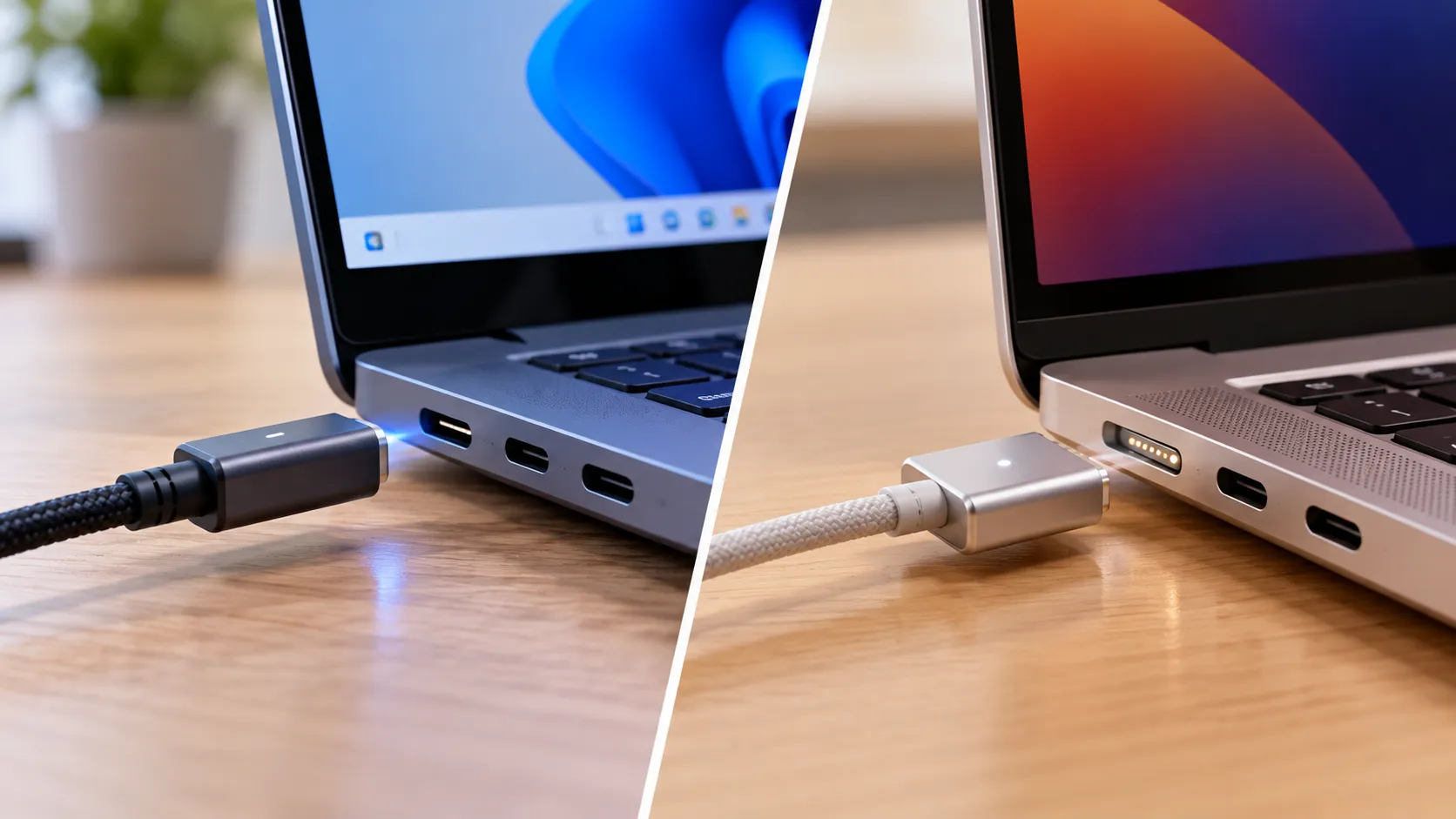
Both Microsoft's new Magnetic Connect charging cable and Apple's MagSafe are designed to detach instead of pulling a laptop off a desk if someone trips over the cord. That part is simple enough. The more important difference is how each system affects the laptop's available ports while charging, and that detail changes how useful magnetic charging actually is.
Here's the short version: Magnetic Connect uses a USB-C port, so plugging in the magnetic charging cable occupies a connector that could otherwise handle data or an external display. MagSafe uses a separate, dedicated charging port, so on a MacBook equipped with MagSafe, charging doesn't occupy a USB-C or Thunderbolt connector.
Microsoft introduced Magnetic Connect with the Surface Laptop Ultra, pairing a USB-C Power Delivery port with a custom magnetic cable, as Engadget explains. Microsoft has since confirmed the laptop's charging specifications and included accessories.
Apple's MagSafe has a longer history on the Mac. The company introduced it in 2006, removed it from its MacBook lineup beginning in 2015, and brought it back with MagSafe 3 on the redesigned MacBook Pro in 2021.
The comparison comes down to how each system works, what the port trade-off costs, and which charging setup better fits a buyer's workflow.
How Microsoft Magnetic Connect actually works
At its core, Magnetic Connect is a USB-C port with Power Delivery support, paired with a custom cable that uses magnets to align and attach the connector.
There's no wireless power transfer involved. The magnets handle alignment and attachment, while electrical contacts deliver power through the connection.
Ordinary USB-C charging equipment can still be used with the same port, since Magnetic Connect builds on USB-C rather than replacing it.
Microsoft also confirms that the Surface Laptop Ultra can charge through any of its three USB-C ports. The magnetic cable adds convenience, but it isn't the only way to charge the machine.
That design choice follows Microsoft's history with magnetic charging. Apple introduced MagSafe in 2006, while Microsoft introduced Surface Connect with the Surface Pro 3 in 2014, offering a similar detachable charging connection.
Surface Connect has since become less central to Microsoft's newer hardware and accessories, with USB-C increasingly handling charging and docking.
Magnetic Connect keeps the convenience of a magnetic cable without needing a separate charging port.
That doesn't guarantee Magnetic Connect will become a long-term standard, but it explains why Microsoft built the magnetic feature around USB-C instead of introducing another standalone connector.
How the Apple MacBook MagSafe connector compares
MagSafe takes a different approach. Its proprietary connector uses a dedicated charging port rather than adding magnetic attachment to an existing USB-C port.
Apple introduced MagSafe on the Mac in 2006 and began moving away from it with the 12-inch MacBook in 2015. The company later brought it back as MagSafe 3 with the redesigned MacBook Pro in 2021.
Because MagSafe isn't USB-C, plugging a MagSafe cable into a compatible MacBook doesn't occupy one of its USB-C or Thunderbolt ports.
That matters for users who regularly connect external monitors, storage devices, docks, or other accessories while charging.
The benefit depends on the MacBook model. Not every MacBook has a MagSafe port, so buyers should check the specifications of the particular machine they're considering.
Compatible MacBooks can also charge through supported USB-C ports, providing another option when the MagSafe cable isn't available.
USB-C magnetic charging vs MagSafe: what happens to your ports
Microsoft's Magnetic Connect design comes with a straightforward trade-off. When the magnetic charging cable is attached, it occupies one USB-C port that could otherwise be used for another accessory.
However, the Surface Laptop Ultra has two additional USB-C ports, alongside HDMI, USB-A, an SD card reader, and a 3.5mm headphone jack.
That gives users several alternatives for connecting accessories while charging.
Microsoft's official specifications also clarify an important detail: all three USB-C ports support charging at up to 140W, data transfer at up to 40Gbps, and DisplayPort 2.1 output.
That means the two additional USB-C ports aren't restricted to basic accessories or lower-power charging.
The Magnetic Connect port itself retains USB-C data and display capabilities when used with compatible equipment. The practical limitation is that Microsoft's magnetic charging cable occupies the connector while attached.
For someone juggling an external monitor, a wireless mouse dongle, and a USB flash drive while charging, the Surface Laptop Ultra's other ports should cover many everyday needs.
More demanding setups involving multiple external drives, docks, and displays may still require a hub or docking station.
MagSafe avoids this particular trade-off by keeping charging on a separate connector.
That doesn't automatically make a MagSafe-equipped MacBook better connected overall. The number and capabilities of its remaining ports still depend on the model.
The meaningful comparison is how many usable ports each laptop leaves available while charging, not simply whether its power connector is magnetic.
Cables, costs, and compatibility
Apple's MagSafe 3 uses a proprietary connector, with Apple's official USB-C to MagSafe 3 cable priced at $49 in the US.
Third-party MagSafe-compatible cables are also available, but compatibility and quality can vary. Buyers should check the cable's specifications rather than assuming every alternative performs identically to Apple's version.
Microsoft's Magnetic Connect uses a different arrangement.
The Surface Laptop Ultra support page confirms that every Surface Laptop Ultra includes a Magnetic Connect cable.
The cable connects to a compatible USB-C power adapter, while its magnetic end attaches to the laptop.
Microsoft recommends a 140W adapter and specifies a minimum of 115W for fast charging. A lower-powered USB-C charger may reduce charging speed and laptop performance, particularly during demanding workloads.
Microsoft also says the magnetic cable can be reversed when used with its 140W USB-C power adapter, allowing the adapter's magnetic connection to serve as the attachment point while the cable's USB-C end charges another compatible device.
That flexibility is a meaningful advantage over a cable that works only with a proprietary laptop charging port.
However, the presence of USB-C doesn't mean every third-party magnetic charging cable is safe or compatible.
Magnetic connectors must still handle the required power, maintain reliable electrical contact, and meet appropriate USB-C specifications.
Microsoft hasn't established a universal third-party Magnetic Connect certification program, so buyers shouldn't assume inexpensive magnetic adapters will deliver the same performance or safety.
Microsoft has expressed interest in broader industry adoption of Magnetic Connect, but that ambition isn't the same as an announced licensing program or confirmed support from other PC manufacturers.
One technical limit applies regardless of the port debate. USB Power Delivery supports up to 240W under its Extended Power Range specification.
The Surface Laptop Ultra's own charging limit is lower, at 140W, which Microsoft explicitly documents.
That distinction matters because the maximum supported by a charging standard isn't necessarily the wattage available on a particular laptop.
What to check before you buy
Lean toward MagSafe if keeping every USB-C and Thunderbolt port free while charging matters to your workflow, particularly if you regularly connect multiple accessories without a dock.
Lean toward Magnetic Connect if you prefer a magnetic cable built around USB-C, appreciate the ability to charge through other USB-C ports, and have enough connections on the Surface Laptop Ultra for your accessories.
The Surface Laptop Ultra's charging specifications are now documented: it supports up to 140W through any USB-C port, requires at least 115W for fast charging, and includes the magnetic cable.
Its two additional USB-C ports also support 40Gbps data transfer and DisplayPort 2.1, removing much of the uncertainty around whether charging through one port compromises the capabilities of the others.
Before choosing either machine specifically for its charging setup, compare the complete port layout, the included power accessories, and the cost of replacement cables.
MagSafe preserves a dedicated charging connector, while Magnetic Connect prioritizes USB-C versatility. Neither approach is automatically superior. The better choice depends on how many ports you need available while your laptop is plugged in.

















Comments
Be the first, drop a comment!