



Microsoft is gradually updating some of Windows 11's oldest interface elements with replacements built using WinUI 3, its current native user-interface framework. The latest preview-build discovery suggests that the familiar File Properties window may be next, although the redesign remains hidden and cannot be enabled through normal Windows settings.
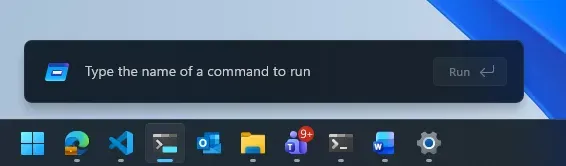
One replacement is already available for testing: a rebuilt Run dialog with dark mode, updated controls, and new navigation features. It is limited to Windows Insiders in Microsoft's Experimental channel, and the classic Run dialog remains the default.
How to try Windows 11's new Run dialog
Run is the compact command window that opens when you press Windows+R. It can quickly launch apps, folders, Windows utilities, and Settings pages.
Microsoft rebuilt the dialog as a C# and WinUI 3 application compiled with .NET ahead-of-time technology, which converts managed code into native code before the app runs. According to Microsoft's Windows Command Line team, the modern version had a median time to appear of 94 milliseconds in the company's testing, compared with 103 milliseconds for the legacy dialog.
Most people are unlikely to notice a 9-millisecond difference. The measurement is still relevant because Microsoft managed to rebuild the interface with a newer framework without making it slower, based on the company's published results.
The redesigned Run dialog also includes:
Dark mode support
App icons beside recent commands
Styling that better matches Windows 11
~\ as a shortcut to the current user's home directory
To try it, your PC must be enrolled in the Windows Insider Experimental channel. Open Settings > System > Advanced, then turn on the Run Dialog option. Microsoft is rolling out the feature gradually, so the toggle may not appear immediately on every eligible PC.
Microsoft also studied how people used the previous dialog before deciding what to preserve. Telemetry collected from a sample of 35 million users showed that 0.0038% clicked its Browse button. The company also found that some users pasted text into Run and copied it back out without executing a command, using the dialog to remove rich-text formatting. That behavior remains available in the replacement.
Because the new Run dialog is optional, testers can return to the classic version by turning off the same Settings toggle.
File Properties could be Microsoft's next major redesign
Microsoft also appears to be testing a WinUI 3 replacement for the File Properties window, which normally opens when you right-click a file and select Properties.
The experimental interface was found in Windows 11 Insider Preview Build 26300.8935, which Microsoft released to the Experimental channel on July 20, 2026. It currently appears only when viewing the properties of a deleted file in the Recycle Bin.
Images of the hidden interface show a cleaner layout and dark-mode support, but it does not yet include all the information and tabs found in the existing Properties window. Its limited scope indicates that it is an early test rather than a finished replacement.
Microsoft has not formally announced the redesigned Properties window or provided a release date. As Windows Central reported, its appearance in the Recycle Bin is an initial sign that the company is exploring a broader update.
Replacing Properties would be more complicated than rebuilding Run. Some Windows programs use shell extensions to add information or controls to property sheets. Any complete replacement would need to account for those integrations to avoid removing functions that users rely on.
That compatibility burden helps explain why Windows 11 still contains interfaces with roots in earlier versions of the operating system. A self-contained tool such as Run can be rebuilt with relatively few outside dependencies. File-management interfaces connected to third-party software require more extensive testing.
For now, the modern Run dialog is the only part of this work that users can enable themselves. The redesigned Properties window remains a hidden preview feature, and Microsoft has not confirmed whether its current design will reach stable versions of Windows 11.

















Comments
Be the first, drop a comment!