



Microsoft announced a broad Copilot in Excel update on June 25, adding finance-focused skills, federated data connectors, and workbook change-tracking features for Microsoft 365 Copilot customers. The release targets FP&A analysts, corporate finance teams, and investment professionals who use Excel for forecasting, reporting, valuation, and close-related work.
The update centers on three areas: reusable skills, external data access, and traceability. Skills let teams define repeatable workflows for tasks such as DCF modeling, monthly reporting, and variance analysis. Six additional finance connectors — CB Insights, Daloopa, FactSet, Morningstar, PitchBook, and S&P Global — join the LSEG and Moody's connectors Microsoft released in May 2026, bringing the named finance connector list to eight. Copilot-attributed changes in Excel's Show Changes pane give reviewers a record of what the AI modified.
The rollout is staggered. Microsoft says personalization, workbook rules, pre-built skills, federated Copilot connectors, Plan with Copilot, and Copilot attribution in Show Changes are generally available for Microsoft 365 Copilot customers across Excel for Web, Windows, and Mac. Custom skills are available through the Insiders channel for Windows and Mac and are expected to reach general availability in July 2026. Partner-built skills are planned for Q3 2026.
Reusable skills standardize finance workflows
The skills feature changes how Microsoft wants finance teams to use Copilot in Excel: not just as a prompt responder, but as a way to apply repeatable instructions across recurring spreadsheet work.
A skill is a structured instruction set, written as a standard markdown file, that tells Copilot how to execute a defined process: which steps to follow, what formatting to apply, and how to structure the output. Microsoft says teams can save a SKILL.md file in OneDrive so Copilot can apply the process to work such as a three-statement model or board package.
The practical upside is standardization. A finance team could encode a DCF methodology once, then have analysts apply the same structure and formatting across similar workbooks. Microsoft says it evaluates Copilot in Excel against finance task-complexity benchmarks and Financial Modeling Institute cases, but it has not published independent production results showing how reliably those skills perform across real company workbooks. Finance teams should test that gap before relying on skills for high-stakes reporting.
Finance connectors bring external data into Excel
The connector update addresses a familiar finance workflow problem: moving vendor data into Excel without repeated exports, reformatting, and manual checks. Microsoft says federated connectors let Copilot retrieve information from external services without importing or storing that data in the workbook. Copilot uses the user's credentials, accesses only data the user has permission to view, and requires explicit consent before sending data to an external service.
The added finance connectors cover several data categories used in public-market, private-market, investment research, financial modeling, and company-intelligence workflows. CB Insights focuses on private-company and market intelligence. Daloopa provides financial data sourced from company filings and other public materials. FactSet connects Excel workflows to financial and alternative data. Morningstar adds investment research, ratings, and portfolio analytics. PitchBook brings private capital market data into Excel. S&P Global, through Kensho's Deterministic Retrieval, supports structured access to S&P Global datasets.
FactSet is still in preview and is expected to become generally available in July 2026. Microsoft also says third-party connectors and data providers may require separate licensing or subscriptions, so finance teams should confirm provider entitlements before building a workflow around any connector.
The provider list is useful, but the public documentation is still limited. Microsoft describes the connectors mostly by data category and use case, not by historical depth, coverage universe, refresh cadence, query limits, or provider-specific compliance terms. Finance teams should confirm data entitlements, residency requirements, and usage limits with each provider before treating a connector as production infrastructure.
Change tracking gives reviewers a clearer trail
Skills and connectors are only useful in finance if reviewers can see what changed and verify the source behind the output.
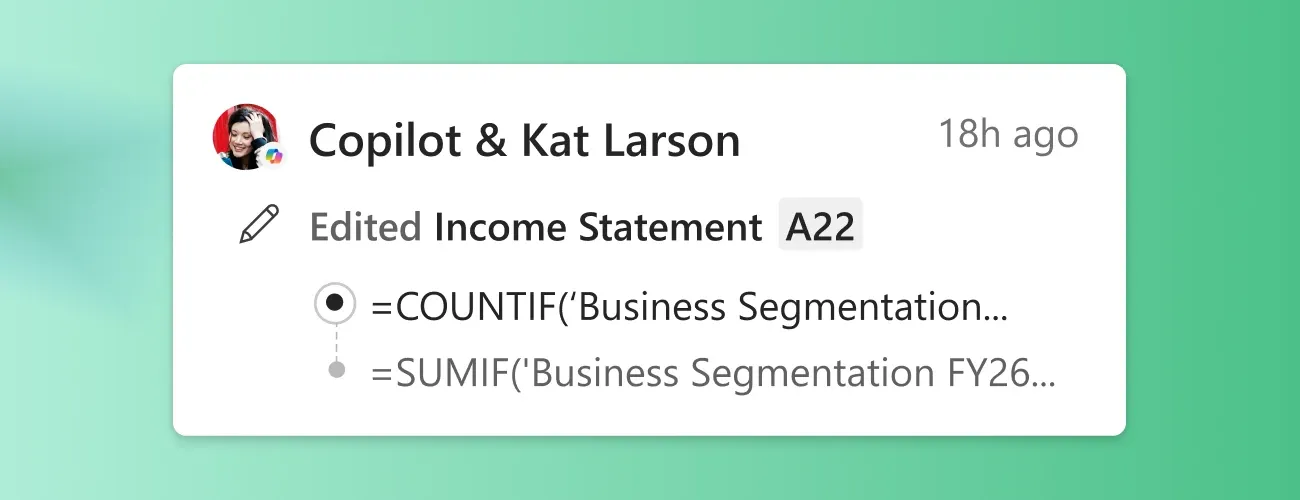
Copilot attribution in Show Changes is now generally available. Microsoft says Copilot-made edits remain traceable, link back to affected cells, and appear alongside collaborator changes in the Show Changes pane. Plan with Copilot also lets users review the ranges, worksheets, formulas, and assumptions Copilot intends to update before it makes changes.
That does not make Copilot output audit-ready by default. Finance teams should still test whether Microsoft's change tracking captures the details their review processes require, including workbook version, affected sheets and ranges, source data, formula changes, reviewer edits, exports, and sharing history.
For internal reporting and reconciliation workflows, the current controls may be enough to justify a pilot. For regulated external deliverables or complex multi-step models, the documentation does not yet provide enough public detail to replace existing review and sign-off processes.
Checks to run before a pilot
Before using these features in production, finance teams should test four areas:
Access and licensing. Confirm which features are available under your Microsoft 365 Copilot license and whether each connector requires a separate provider subscription.
Rollout stage. Pre-built skills and federated connectors are generally available. Custom skills remain in Insider preview until July 2026, and partner-built skills are planned for Q3 2026.
Review scope. Test what Show Changes captures in your environment, including affected cells, formula edits, source references, reviewer changes, and approval history.
Use-case fit. Start with internal workflows such as monthly reporting packs, variance analysis, close-related reviews, and reconciliations where a human reviews the output. Avoid using the tools for regulated external deliverables until your team has validated source access, change tracking, and review controls.
Microsoft's larger Excel Copilot play
Microsoft is positioning Copilot in Excel as more than a prompt-based spreadsheet assistant. Skills, connectors, and Copilot-attributed changes point toward a workflow layer for finance teams that need repeatable processes, governed data access, and reviewable workbook edits.
Partner-built skills planned for Q3 2026 also suggest Microsoft wants Excel Copilot to become a distribution point for finance-specific workflows from third-party developers.
The open question is how well these features perform inside real company workbooks. Microsoft has described its evaluation approach, but finance teams still need their own validation before using Copilot-generated work in high-stakes reporting. Start with a controlled internal workflow, test the source citations and Show Changes trail, then decide whether the tools are reliable enough for broader use.















Comments
Be the first, drop a comment!